The free addons for WoW TBC Anniversary and WoW: Forever, and the loot uploader
The addon is free on CurseForge and worth having on its own; the uploader is for the loot master. Neither is required to use the site and the Discord bot.
The in-game addon version 0.10.20
Who in the guild can make it. A Professions tab in the addon's window lists every craft of every profession, grouped by slot, highest skill first. Pick a profession and a slot, and each row names the guildmates who know the recipe, in class colour, with a green dot when they are online right now — and the materials exactly as the crafter's own profession window lists them. Search a recipe, a material or a crafter across every profession, or type /vrt who mongoose; shift-click a row to link the item, right-click to whisper a crafter.
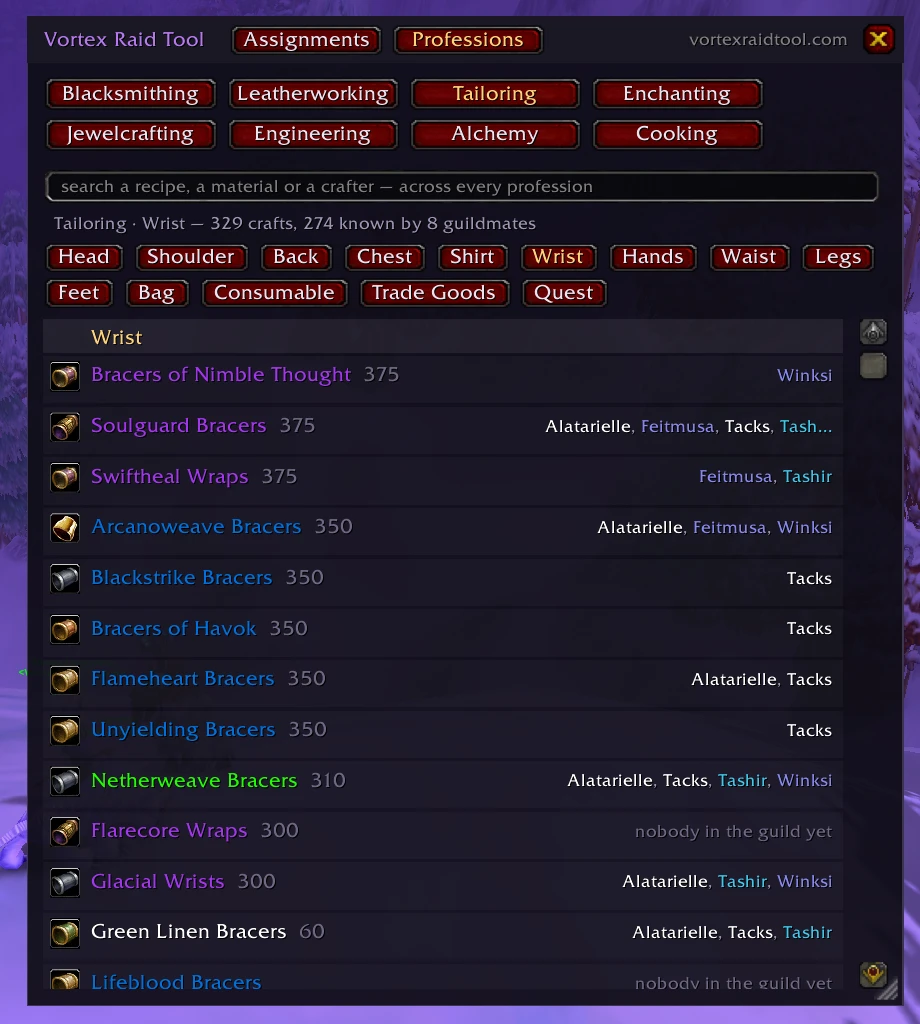
The guild keeps it current by itself. Open a profession window and your recipes, with their materials, reach every guildmate who runs the addon; a client asks the guild for whatever it lacks when it logs in, and again every half hour. Your resistance gear (bags, bank and what you are wearing, gems and enchants counted), the guild bank and the guild roster travel the same way, over the game's own addon channel. Nothing is written in chat, nothing leaves the guild, and this part needs no website and no account.
With the site: your raid's assignments, in the game, on the pull. Who interrupts, who dispels, where each group stands — with the room picture beside it. One raider with the addon sends the sheet to everyone else who has it, and what the addon read off each character reaches the officers' pages through one uploader, so nobody fills in a spreadsheet.
A raid where one person is on last week's copy is a raid looking at last week's picture, and the app is what stops that. The addon is only distributed through CurseForge — every file there is checked before it goes up — and installing by hand is a download from that same page.
Where it goes
The CurseForge app does this part for you. By hand, with the file from the CurseForge page:
- Unzip it into your AddOns folder:
World of Warcraft\_anniversary_\Interface\AddOns - You should end up with one folder,
...\AddOns\VortexRaidTool— not a folder inside another folder of the same name. The room pictures are inside it; there is nothing else to install. - Restart the game. A
/reloadis not enough for an addon it has never seen. - Click the minimap button, or type
/vrt.
Had an earlier version? The pictures used to sit in a second folder beside the addon. Delete ...\AddOns\VortexRaidTool_Pictures — otherwise the game keeps drawing the copies inside it, and those are the old diagrams.
| /vrt | open and close the window |
| /vrt who <text> | the professions tab — /vrt who mongoose searches every profession |
| /vrt sync | ask the guild for what this client lacks (it does so by itself after login and every half hour) |
| /vrt share on|off | take part in the guild keeping itself up to date — on unless you say otherwise |
| /vrt paste | paste a raid from the assignments page |
| /vrt send | send it to everyone in the raid who has the addon |
| /vrt gear | what it has read off your own character |
| /vrt bank · /vrt guild | the last guild bank read, the last guild roster read |
| /vrt log · /vrt comms | what the addon has done lately, and what it has sent and heard — it never writes in chat |
| /vrt minimap | hide or show the minimap button |
If it does not appear in the addon list, tick Load out of date AddOns on the character screen. Your guild already runs the tool? The raider's page is the three things to do, once.
Vortex Raid Tool Forever — the addon for World of Warcraft: Forever
A separate addon for the Forever client, built from the same code: the Professions tab with every craft of every profession and who in the guild can make it (Forever's own recipes included), the guild bank and roster reads, the assignments tab. It is on the Forever beta now and goes to CurseForge, under its own listing, once it has been seen working there. One uploader serves both games. What the tool does on Forever →
The loot master's uploader
Reads the loot your council already records — RCLootCouncil, Gargul, CEPGP or a DKP addon — out of the game's SavedVariables and files it for the guild, so loot history and standings keep themselves up to date. It runs quietly on the loot master's PC and needs nothing else installed.
It is handed out inside the tool, made for your guild — not as a plain download here. An officer takes it from the guild's own Settings page (Settings → Uploader) or types /uploader in the guild's Discord, and gets a link that carries the guild's name, so the file knows which guild it belongs to on its first run. A cross-platform version for Node is offered in the same places.
What it sends, and where: the loot history your council records and what the addon collected, to your own guild's site only, over HTTPS, with a token your guild master can rotate. Nothing else leaves the PC. Its source is public at github.com/bloodl/vrt-uploader.
New here?
Vortex Raid Tool builds raid assignments from your Raid-Helper comp, works out loot priority from your guild's Warcraft Logs, and puts both in Discord and on a site your raiders can read. The addon's Professions tab and guild sync work for any guild, with or without the site.
Set it up for your guild Open the demo guild Free assignment sheets
Vortex Raid Tool · For raiders · For officers · The free addon · Boss guides · Talent calculators · What’s new · Terms · Privacy · Help & support
Vortex Raid Tool is an independent fan-made tool and is not affiliated with or endorsed by Blizzard Entertainment. World of Warcraft is a trademark of Blizzard Entertainment, Inc.